How To See Who Shared Your Instagram Post
March 29, 2026 · Naman Patel

Want to know who’s been sharing your Instagram posts? You’re in the right place.
Instagram doesn’t make it easy to track post shares. But with the right approach (and account type), you can see exactly who’s resharing your content.
In this guide, I’ll show you step-by-step how to see who shared your Instagram post, plus some clever workarounds that most people don’t know about.
Let’s dive in.
Can You See Who Shared Your Instagram Post?
Due to Instagram’s privacy policies, you cannot see the individual names of users who shared your post via Direct Message (DM).
However, if you have a Business or Creator Account, you CAN track valuable share data:
| What You CAN See | What You CANNOT See |
| Individual names who shared your post to their Instagram Stories (for 24 hours). | Who sent your post via Direct Messages (DMs). |
| The Total number of shares (DMs + Stories) via Instagram Insights. | Shares to external platforms (like WhatsApp or Facebook). |
| Share analytics through Instagram Insights. | Historical story reshares older than 24 hours. |
The key thing to understand is that Instagram prioritizes user privacy. When someone shares your post privately, Instagram keeps that information private.
However, when someone shares to their public Instagram Story, that’s fair game.
Step 1: Switch to a Business or Creator Account
First things first:
You need a professional Instagram account to access share tracking features. Personal accounts can’t see who shared their posts. Period.
The good news? Switching to a Business or Creator account is 100% free and takes about 2 minutes.
Here’s how to do it:
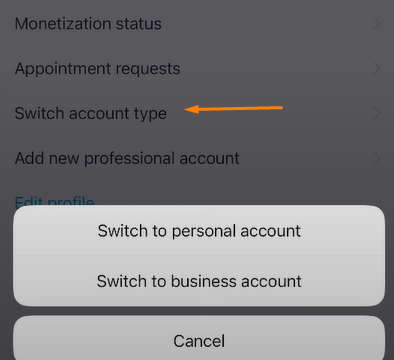
On mobile:
Go to your profile and tap the three lines (≡) Select “Settings and privacy” Tap “Account type and tools” Choose “Switch to professional account” Pick either “Creator” or “Business” Select your category and you’re done
On desktop:
Click your profile picture Go to “Settings” Select “Account type and tools” Click “Switch to professional account” Follow the prompts
Pro tip: Choose “Creator” if you’re an influencer, artist, or content creator. Choose “Business” if you’re promoting a company, brand, or service.
Step 2: Use the “View Story Reshares” Feature
This is the most reliable way to see who shared your Instagram post to their Story.
Here’s exactly how to do it:
- Find the post you want to check
- Tap the three dots (…) in the top-right corner
- Select “View story reshares”
You’ll see a list of everyone who shared your post to their Stories.
Important: This only shows reshares from the last 24 hours. Instagram Stories disappear after a day, so you need to check regularly.
You’ll see two types of accounts here:
- Public accounts that reshared your post
- Private accounts you follow that reshared your post
If someone has a private account and you don’t follow them, their reshare won’t appear in this list.
Step 3: Check Instagram Insights for Share Data
Instagram Insights gives you the bigger picture of your share performance.
To access post insights:
- Go to any of your posts
- Tap “View Insights” (below the post)
- Look for the “Shares” metric under “Interactions”
This number includes:
- Story reshares
- Direct Message shares
- External shares (to other apps)
While you can’t see individual names for DM shares, this total gives you a sense of how shareable your content is.
Pro tip: Compare share numbers across different posts to identify your most shareable content types. This total share count is the single most important metric for gauging content virality.
Alternative Methods to Track Shares (Workarounds)
Instagram’s built-in tools have limitations. But there are some clever workarounds:
Method 1: Monitor Story Mentions When someone shares your post to their Story and tags you, Instagram sends a notification.
These notifications appear in your DMs as: “@username mentioned you in their story.”
Even if you miss the notification, you can find these mentions by:
- Going to your DMs
- Looking for messages about story mentions
- Tapping to view the story (if it’s still live)
Method 2: Search for Your Username People often tag you when reposting your content to their feed. Try this:
- Use Instagram’s search function
- Search for your username or handle
- Look through recent posts that mention you
- Check if any of these are reposts of your content
Method 3: Track Branded Hashtags If you use branded hashtags, monitor them regularly:
- Search for your branded hashtag
- Look for posts using your hashtag
- See if users are repostiing your content with your hashtag
Method 4: Use Third-Party Tools Tools like Hootsuite, Sprout Social, and Later can provide additional insights:
- More detailed analytics
- Historical data beyond Instagram’s limits
- Cross-platform tracking
- Automated monitoring
Note: These tools pull data from Instagram Insights, so they can’t show you DM shares either. But they often present the data in more useful ways.
Why Instagram Limits Share Tracking
Instagram’s share limitations aren’t accidental. Here’s why they exist:
- Privacy protection: When someone shares your post privately, Instagram treats it as a private interaction. Revealing this would violate user privacy expectations.
- Encouraging authentic sharing: If people knew their shares were being tracked and made visible, they might share less freely. Anonymous sharing encourages more organic content distribution.
- Platform integrity: Instagram wants to maintain trust between users. Over-monitoring could make the platform feel invasive.
Understanding these reasons helps you focus on what you can control rather than getting frustrated by limitations.
How to Increase Your Instagram Post Shares
Now that you know how to track shares, let’s talk about getting more of them. As an Instagram Growth Agency, Hypzy knows that focusing on shareability is the best way to leverage the data you do receive.
Here are the proven tactics that work:
1. Create Highly Shareable Content
- Educational posts perform best: Tutorials, tips, and how-to content get shared more than entertainment posts.
- Emotional content spreads: Posts that make people laugh, inspire them, or make them think deeply tend to get shared more.
- Visual appeal matters: High-quality images and videos are more likely to be reshared to Stories.
- Pro-Level Content Formats: Focus on “Saves and Shares” content like infographics, quick checklists, carousels with dense information, and step-by-step guides.
2. Use Clear Calls-to-Action (CTAs)
Don’t be shy about asking for shares:
- “Share this to your Story if you agree”
- “DM this to a friend who needs this tip!”
- “Tag someone who needs to see this”
- “Send this to a friend who would love this tip”
3. Optimize for Story Sharing
Design content that looks good when shared to Stories:
- Use vertical formats (9:16 aspect ratio)
- Include bold, readable text
- Choose high-contrast colors
- Keep important elements away from the edges
4. Post at Peak Times
Use Instagram Insights to find when your audience is most active:
- Go to Insights
- Check “Audience” data
- Look at “Most Active Times”
- Schedule posts during these peak hours. (Tip: Cross-reference your peak times with global engagement studies to find the ideal balance.)
5. Engage with Sharers
When people share your content:
- Thank them in the comments or DMs
- Share their Story to your own Story
- Build relationships with frequent sharers
This encourages more sharing in the future.
FAQ
Can I see who shared my post after 24 hours?
No, story reshares are only visible for 24 hours. After that, you can only see the total share count in Insights.
Do I need a certain number of followers to track shares?
No, there’s no minimum follower requirement. You just need a Business or Creator account.
Can I prevent people from sharing my posts?
Yes, you can limit sharing in Settings > Privacy > Sharing and reuse. You can turn off “Posts and Reels to Stories” and “Stories in Messages.”
The Bottom Line
Instagram’s share tracking has limitations, but you can still get valuable insights about who’s sharing your content.
The key takeaways:
- You need a professional account to track shares
- Story reshares are the only shares where you can see individual users
- Check “View story reshares” within 24 hours
- Use Instagram Insights for overall share performance
Most importantly, don’t let the limitations discourage you. Even with these restrictions, you can build a strong understanding of how your content spreads and who your biggest advocates are.
The data you can access is enough to optimize your content strategy and grow your Instagram presence effectively.